
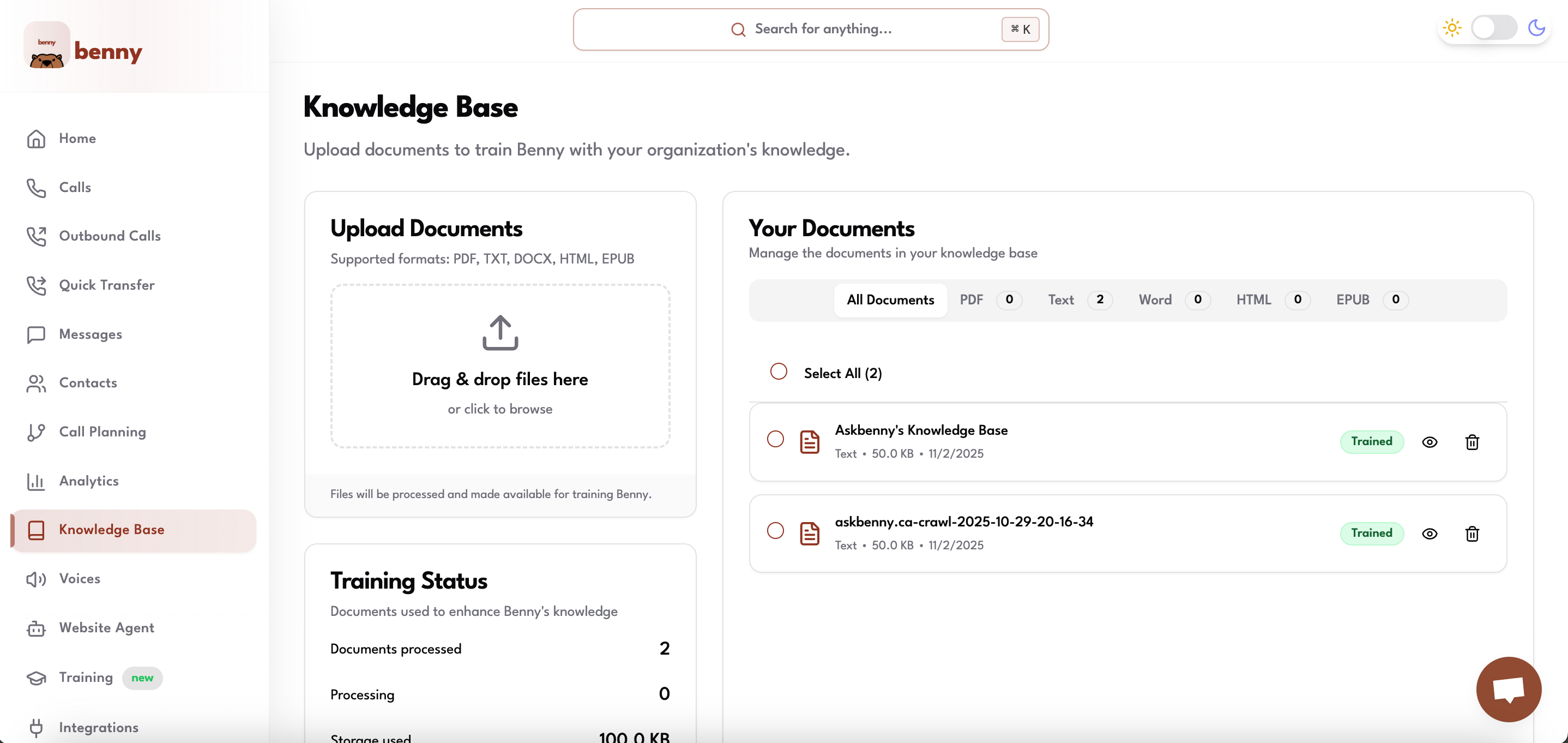
The Ask Benny Knowledge Base helps you train your AI receptionist with company-specific information so it can answer calls more accurately and efficiently. By adding your own content, Benny learns the details that make your business unique and provides the right answers to every caller.
You can set up your Knowledge Base in two ways: by uploading documents or by using website crawl to sync your online content automatically. Both methods ensure Benny understands your services, policies, and customer expectations.
Option 1: Upload Documents
Uploading documents is the easiest way to start teaching Benny about your business. You can add internal materials such as FAQs, pricing sheets, policies, service guides, menus, or training documents.
Supported formats include PDF, Word (DOCX), Text (TXT), HTML, and EPUB. Once uploaded, files are processed into text so Benny can refer to them when handling calls.
You can update or remove files anytime. Changes are reflected immediately in Benny’s responses, ensuring your assistant always provides up-to-date information.
Example uses:
- A spa uploads treatment menus and cancellation policies.
- A logistics company uploads service area details and operating procedures.
- A real estate team uploads property FAQs and showing instructions.
Learn more about how Benny manages your AI training through the Features page.
Option 2: Website Crawl
If your website already contains the information your customers need, you can let Benny learn directly from it. Website crawl allows you to automatically sync content from your full site or from selected subpages.
This is ideal for businesses that frequently update their websites. Benny will monitor and reprocess your chosen pages based on your selected schedule: hourly, daily, weekly, or monthly. All content is converted into markdown for optimal AI comprehension.
Example uses:
- A healthcare clinic syncs its “Our Services” and “Insurance” pages so Benny can answer coverage questions.
- A retailer syncs “Product Info” and “Returns Policy” pages for product and order support.
- A warehouse crawls its “Inventory Updates” or “Fulfillment Status” pages for real-time caller responses.
How the Knowledge Base Works
1. Choose your setup: Upload Documents or Website Crawl.
2. Benny processes your files or website content into structured text.
3. When a caller asks a question, Benny searches your Knowledge Base for the most accurate answer.
4. You can make changes anytime to keep Benny aligned with your business updates.
Learn more about Benny’s learning process on our How It Works page.
The Knowledge Base ensures Benny answers accurately, consistently, and in your brand’s voice. It helps you reduce repetitive calls, improve efficiency, and deliver a better caller experience.
Businesses across industries use it to manage everything from appointment details and policy information to product guidance and operational processes. Learn more about how Benny helps different industries on our Industries page.
Advanced Use Cases
The Knowledge Base is flexible enough to support a wide range of functions, even beyond standard FAQs.
- Inventory tracking: Train Benny to share stock levels or order updates.
- Product support: Upload product details, materials, and specifications.
- Process documentation: Help Benny answer questions about internal workflows or training steps.
- Internal reference: Use Benny to direct staff or contractors to policies or protocols.
- Team directory: Upload a list of departments, roles, or extensions so Benny can route calls to the right contact.
- Marketing materials: Include brochures, newsletters, or monthly promotions to help Benny share your latest updates.
- Service listings: Add details about additional or seasonal services so callers always hear the most complete information.
Privacy and Data Security
All files and website data are processed securely. Ask Benny is fully compliant with PIPEDA and PHIPA standards. Data is encrypted both in transit and at rest.
Getting Started
To begin, log in to your dashboard and open the Knowledge Base section. Choose whether to upload your own documents or connect your website. Once set up, Benny will start learning immediately.
If you need help, visit our Training Center, message us on chat, or contact our support team at info@askbenny.ca.

About Benjamin Beaverton
Benjamin Beaverton is Ask Benny’s resident expert in all things AI, call handling, and small business success. A proudly Canadian beaver with a knack for staying busy, Benjamin shares insights from the virtual front desk - where no call goes unanswered and no customer is left waiting. When he’s not helping businesses boost their customer service, you’ll find him fine-tuning Benny’s scripts, building better workflows, and occasionally gnawing on tech trends.
Follow Benjamin for smart tips, fresh updates, and a peek behind the bark at Ask Benny HQ.